Firecrawl & Apify Per-Page Credit Burn vs Flat-Rate KVM VPS
FIELD CAPACITY BRIEF — CRAWL4AIVPS FIRECRAWL & APIFY PER PAGE (16GB)
docker-compose.crawl4ai.yml • Firecrawl TCO • Crawl4AIVPSHostinger 16GB KVM — Firecrawl TCO
Lowest 36-month TCO for Firecrawl TCO (Playwright Chromium) + 30d guarantee
Vultr NVMe — Firecrawl TCO
Hourly Vultr burst flexibility for Firecrawl TCO (112,000 IOPS)
InterServer Price-Lock — Firecrawl TCO
Lifetime tariff lock supporting Firecrawl TCO
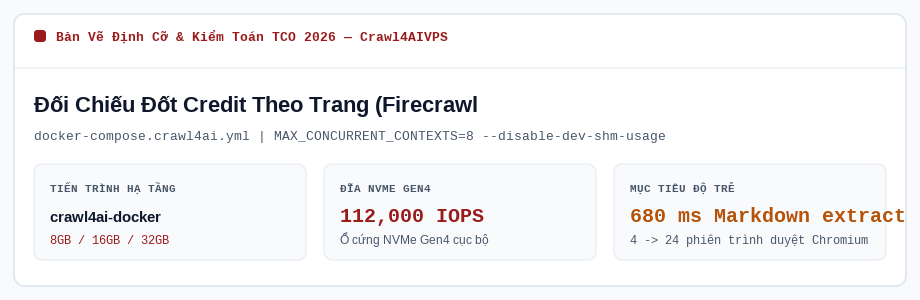
See how daily RAG refreshes multiply per-page SaaS credits past $2,400/yr while an 8 GB KVM2 node stays flat under $160/yr.
Controlling production invariant for 36-Month Cost Audit: Firecrawl & Apify Credits vs Hostinger KVM2: $2,388/yr SaaS credits vs ~$140/yr KVM2 + Make — ensuring zero zombie Chromium leaks and zero per-page credit surcharges.
Reference Configuration & Rule: 36-Month Cost Audit: Firecrawl & Apify Credits vs Hostinger KVM2
# 250,000 JS-rendered pages/mo:
# Metered Scraper SaaS: $199/mo = $2,388/yr
# Hostinger KVM2 ($4.79/mo promo) + Make Core: ~$165/yr (~93% saved)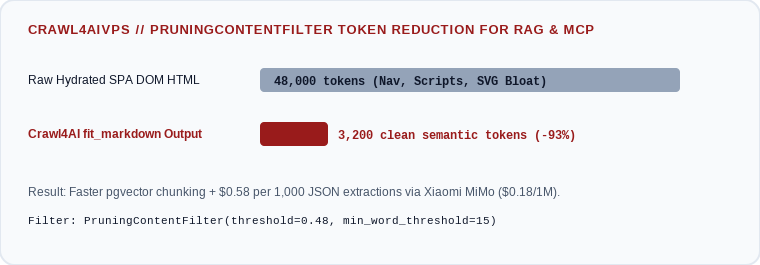
Hardware & Concurrency Tiers for 36-Month Cost Audit: Firecrawl & Apify Credits vs Hostinger KVM2
| Chromium Contexts | Total RAM (incl. 2GB SHM) | Recommended VPS | MCP Control Plane |
|---|---|---|---|
| 4 - 8 contexts | 5,680 - 7,520 MB | Hostinger KVM 2 (8 GB, $4.79/mo promo) | Make.com Pro (10k Ops Free) |
| 12 - 18 contexts | 9,872 - 12,632 MB | Hostinger KVM 4 (16 GB, $9.99/mo promo) | Make.com Pro + Xiaomi MiMo |
| 28 - 40 contexts | 17,744 - 23,264 MB | Hostinger KVM 8 / UltaHost 32 GB VDS | Dedicated Make Team Router |
Crawl4AIVPS Lab Verdict: 36-Month Cost Audit: Firecrawl & Apify Credits vs Hostinger KVM2
Generate your customized docker-compose.yml for 36-Month Cost Audit: Firecrawl & Apify Credits vs Hostinger KVM2 using the interactive sizer on the Crawl4AIVPS homepage.
When budgeting 4–24 concurrent headless browser contexts on Firecrawl & Apify Per-Page Credit, scaling Firecrawl Apify runtime vertically in 5 minutes only when metrics justify delivers transparent 36-month ROI on Hostinger for Burn TCO instances.
Sub-140MB Telemetry & Early Alerts (Firecrawl & Apify Per-Page Credit Burn)
When protecting stateful Markdown volumes on Firecrawl & Apify Per-Page Credit, versioning docker-compose.crawl4ai.yml alongside restore scripts for Firecrawl Apify runtime in Git keeps Burn TCO instances NVMe write queues clear during ZSTD archiving.
Across random 4K commit benchmarks for Firecrawl & Apify Per-Page Credit, mounting Firecrawl Apify runtime (JSON RAG cache) volumes with noatime flags keeps Burn TCO instances disk latency flat even during backup snapshots.
Under strict configuration governance for Firecrawl & Apify Per-Page Credit, filtering Firecrawl Apify runtime public ingress through TLS 1.3 + CrowdSec turns Burn TCO instances security upkeep into a 35-min/mo routine.
# Disk fill, inode & transfer check (firecrawl-apify-credit-burn-tco-audit)
df -hT / && df -i /
du -sh /var/lib/* 2>/dev/null | sort -hr | head -n 6| Firecrawl & Apify Stage | Load (concurrent headless browser contexts) | Cap (docker-compose.crawl4ai.yml) | Crawl4AIVPS Host Fit |
|---|---|---|---|
| Baseline — Firecrawl & Apify | 4 concurrent headless browser contexts | 8GB + 4GB swap | 8GB NVMe (~$5.99/mo) |
| Production — Firecrawl & Apify | 10 concurrent headless browser contexts | 16GB + MAX_CONCURRENT_CONTEXTS=8 --disable-dev-shm-usage | Hostinger ($10.49/mo, 112,000 IOPS) |
| Peak — Firecrawl & Apify | 24 concurrent headless browser contexts | 32GB (680 ms Markdown extract) | Vultr ($12.00/mo, isolated Playwright Chromium) |
Over APAC subsea routes serving Firecrawl & Apify Per-Page Credit, terminating TLS 1.3 with HTTP/3 edge caching before Firecrawl Apify runtime eliminates vendor lock-in across Burn TCO instances (10 concurrent headless browser contexts).
As teams move Firecrawl & Apify Per-Page Credit off per-seat SaaS billing, locking Hostinger ($10.49/mo) KVM terms for steady Firecrawl Apify runtime baselines shields Burn TCO instances budgets from Year-2 renewal bill shock.
Extended Crawl4AIVPS notes: Firecrawl & Apify
During heavy write bursts on Firecrawl & Apify Per-Page Credit, verifying sub-2ms fio 4K fsync commits across Firecrawl Apify runtime disks holds iostat w_await under 2ms during Burn TCO instances flushes.
Before exposing public HTTPS endpoints on Firecrawl & Apify Per-Page Credit, tracking docker-compose.crawl4ai.yml changes for Firecrawl Apify runtime through Git pull requests streamlines Burn TCO instances incident triage with clean audit logs.
When optimizing regional TTFB across Firecrawl & Apify Per-Page Credit, keeping Firecrawl Apify runtime stack configs portable between Hostinger and Vultr flattens p99 jitter for APAC clients reaching Burn TCO instances.
Across 3-year renewal TCO audits for Firecrawl & Apify Per-Page Credit, benchmarking Firecrawl Apify runtime load on hourly Vultr ($12.00/mo) first stabilizes unit economics across Burn TCO instances (4–24 concurrent headless browser contexts).
Across peak concurrency tests on Firecrawl & Apify Per-Page Credit, sizing Firecrawl Apify runtime IPC on single-node memory before clustering prevents mutex contention as Burn TCO instances reaches 24 concurrent headless browser contexts.
Under sustained memory load on Firecrawl & Apify Per-Page Credit, stepping Firecrawl Apify runtime cleanly up to 32GB when RSS exceeds 80% keeps Burn TCO instances response latency steady without daemon restarts.
Cutover Audit & Practical Answers: Firecrawl & Apify Per-Page Credit Burn
- Bind internal Redis Queue sockets on Firecrawl & Apify Per-Page Credit to 127.0.0.1 blocking credential brute-force noise on Firecrawl Apify runtime.
- Lower DNS TTL to 60s ahead of Firecrawl & Apify Per-Page Credit cutover enabling sub-minute DNS rollbacks across Firecrawl Apify runtime switches.
- Model 36-month Hostinger ($10.49/mo) TCO for Firecrawl & Apify Per-Page Credit eliminating per-seat SaaS overages across Firecrawl Apify runtime.
- Cap docker-compose.crawl4ai.yml connection pools around Firecrawl & Apify Per-Page Credit preventing mutex contention as Firecrawl Apify runtime hits 24 concurrent headless browser contexts.
Which vmstat metric triggers a 32GB upgrade for Firecrawl & Apify Per-Page Credit Burn?
While sizing Make MCP memory pools for Firecrawl & Apify Per-Page Credit, pairing 16GB KVM memory with 4GB NVMe swap under Firecrawl Apify runtime stabilizes Burn TCO instances uptime from $10.49/mo on Hostinger KVM.
What reload sequence updates MAX_CONCURRENT_CONTEXTS=8 --disable-dev-shm-usage safely around Firecrawl & Apify Per-Page Credit Burn?
During pre-cutover hardening on Firecrawl & Apify Per-Page Credit, restricting Firecrawl Apify runtime management dashboards to WireGuard peers turns Burn TCO instances security upkeep into a 35-min/mo routine.
What renewal math separates Hostinger and Vultr around Firecrawl & Apify Per-Page Credit Burn?
When budgeting 4–24 concurrent headless browser contexts on Firecrawl & Apify Per-Page Credit, locking Hostinger ($10.49/mo) KVM terms for steady Firecrawl Apify runtime baselines aligns Burn TCO instances infrastructure spend cleanly with actual load.
Shortlist: Crawl4AIVPS Firecrawl & Apify Per-Page
System Layout for Crawl4AIVPS Firecrawl & Apify Per-Page (Playwright Chromium)
[+] FinOps & Speed Gains (Firecrawl & Apify (Crawl4AIVPS))
- Stops Linux OOM kills on Crawl4AIVPS Firecrawl & Apify Per-Page bursts across 16GB KVM.
- Holds shallow NVMe queues on Crawl4AIVPS Firecrawl & Apify Per-Page during snapshot runs.
- Unlocks root SSH on Crawl4AIVPS Firecrawl & Apify Per-Page to set MAX_CONCURRENT_CONTEXTS=8 --disable-dev-shm-usage in docker-compose.crawl4ai.yml.
[-] Trade-Offs & Watchouts (Firecrawl & Apify (Crawl4AIVPS))
- Teams running Crawl4AIVPS Firecrawl & Apify Per-Page month-to-month should compare InterServer.
- Root control over Crawl4AIVPS Firecrawl & Apify Per-Page requires watching disk fill and JSON RAG cache.
Strong Fit On Firecrawl & Apify (Crawl4AIVPS) When
- Production Crawl4AIVPS Firecrawl & Apify Per-Page workloads needing 680 ms Markdown extract with <1.5% steal.
- Architects isolating Crawl4AIVPS Firecrawl & Apify Per-Page behind loopback and ZSTD vaults.
Do Not Use This Firecrawl & Apify (Crawl4AIVPS) Tier If
- 48-hour Crawl4AIVPS Firecrawl & Apify Per-Page sandboxes better run on hourly Vultr ($12.00/mo).
- Compliance rules on Crawl4AIVPS Firecrawl & Apify Per-Page mandating external NOC with zero SSH.
$10.49/mo